Blog

  • DivNectar: Site Study

    DivNectar: Site Study

    Frameworks

    Glad to see that you’re a little curious about how my website works! It’s certainly not the prettiest of most functional website ever made – but it’s my little home on the internet, and I’m more than happy with it. It’s the cumlative effort of a few years of work. I’ve scrapped pieces of the site and built new ones. It’s an ever changing project.

    AstroJS

    The site itself uses AstroJS as the core web framework. Astro is a wonderful web framework, as it can be as simple or as complex as your site needs. It can be a static generated website or it can have dynamic parts that only load on the client or on the server. This flexibility has allowed me to build a BLAZINGLY fast website. It’s seriously fast – open your devtools (crtl ⎇ Alt I) and open the lighthouse page score tool and check out my score. My website (when last checked) got over a 95 on the lighthouse score…meaning it couldn’t be much faster than it already is.

    Looks: Tailwind CSS

    As for the decoration/theme of the site, I’m not using a framework. There is no general UI framework on DivNectar – everything is custom CSS made using Tailwinds’s CSS classes. I did create a custom tailwind theme that uses the Catppuccin color scheme (light and dark/mocha theme) that allows me to reference catppuccin colors that can change when the light/dark theme changes. The site is built from a mobile-first philophsy (meaning the site was built for mobile then adapted to desktop). I do utilize some helper components (like buttons, content cards, an image component for optimization, etc). Overall I’ve been very happy with the aesthetics of the website. To me it’s just lacking in content (which I am trying to fix currently)

    Search Engine Optimization

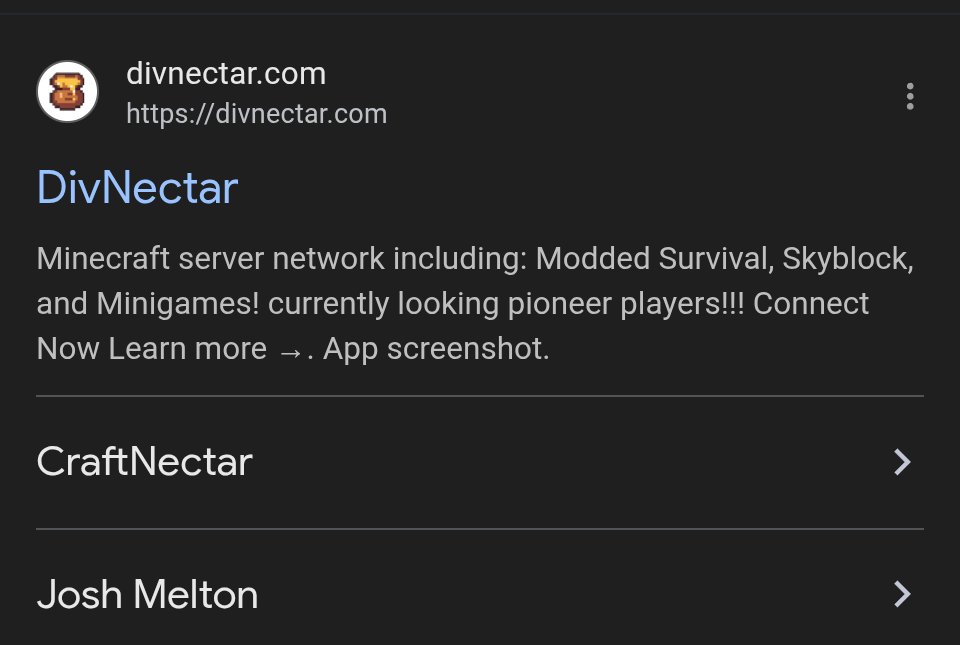
    If you Google DivNectar my website is the first result you see. I’ve went thru great lengths to achieve the strongest ranking for my main keyword – which is DivNectar. Most pages on my site implement jsonLD, which is a unique form of JSON that the Google crawl bot can read to add additional information to your Google listing when searched for. Check out my search results here:
    Screenshot_20251203-171750.png
    As you can see, underneath the website URL it shows CraftNectar and Josh Melton. My Minecraft page uses a "software" jsonLD schema, while my about me/resume page uses a "person" jsonLD schema. When the google bots see this it adds the additional info to my search listing. Pretty cool right? Eventually I would love to get this working for my blog posts as well, but that’s another can of worms as they aren’t staticlly generated blog posts. Speaking of…let’s talk about that next

    The Blog

    The blog on DivNectar basically just uses AstroJS features. The actual blog page which shows all of my posts is just a regular old AstroJS page that fires off an http request to my Wordpress backend. The frontend site receives this data, and then formats and displays it as Blog post cards.When clicked, the user is taken to the [slug].Astro page. The bracket notation around the word slug means that this value can be dynamic. When a user clicks a blog post to view, slug becomes the slug of the blog post – the page then knows which post to retrieve from the Wordpress backend and display to the user. Recently, I used AI to generate a plugin for my note-taking app of choice (Obsidian notes) that allows me to take a markdown file from my notes app and upload it to my Wordpress install as a post (which effectively makes it a blog post). The plugin retains the markdown format instead of converting it to HTML…this makes it easy for my site to consume and render the blog post in a custom way. AstroJS has a built-in markdown parser that can convert the markdown from the post into actual web components. So paragraphs become p tags, lists become ul tags, and so on and so forth. This gives me complete control of how things are rendered and how they look. I couldn’t be happier with this system! Write now I’m authoring this post from my phone while bored at work using a bluetooth keyboard.

    // File name: index.js
    print("Testing codeblocks!!!");
    if(true) {
        print("something else");
    }
  • How I Organize my Hobbies with Obsidian

    How I Organize my Hobbies with Obsidian

    Why Obsidian?

    If you’re anything like me, you often find it hard to keep track of all the things you’re working on, or maybe just the things you want to work on. For me personally, my mind goes a million miles per hour most of the time. Thoughts and ideas have the habit of being fleeting – it took me some years but I have finally learned that if I don’t write these fleeting ideas down then they just disappear 🫥. This isn’t ideal as sometimes the best thoughts are the fleeting ones – right before you sleep, during a shower, while eating, etc. Writing these ideas down as you have them keeps them from being lost.Then we’re presented with a new issue; our note software is full of random unorganized ideas that are a pain to sift through. In some cases it can be nearly impossible to find the text that you’re looking for. That’s where Obsidian has changed my life. You can think of Obsidian as one of the most flexible pieces of software available for keeping personal knowledge. It can be as simple or as complex as you’d like to make it. It’s essentially a markdown note editor with database-like features built into it. It is also extensible via plugins that are available in-app. Obsidian has become a nearly indispensable app in my life…without it my very limited free time would be spent thinking of what I want to do on any day.

    My Workflow

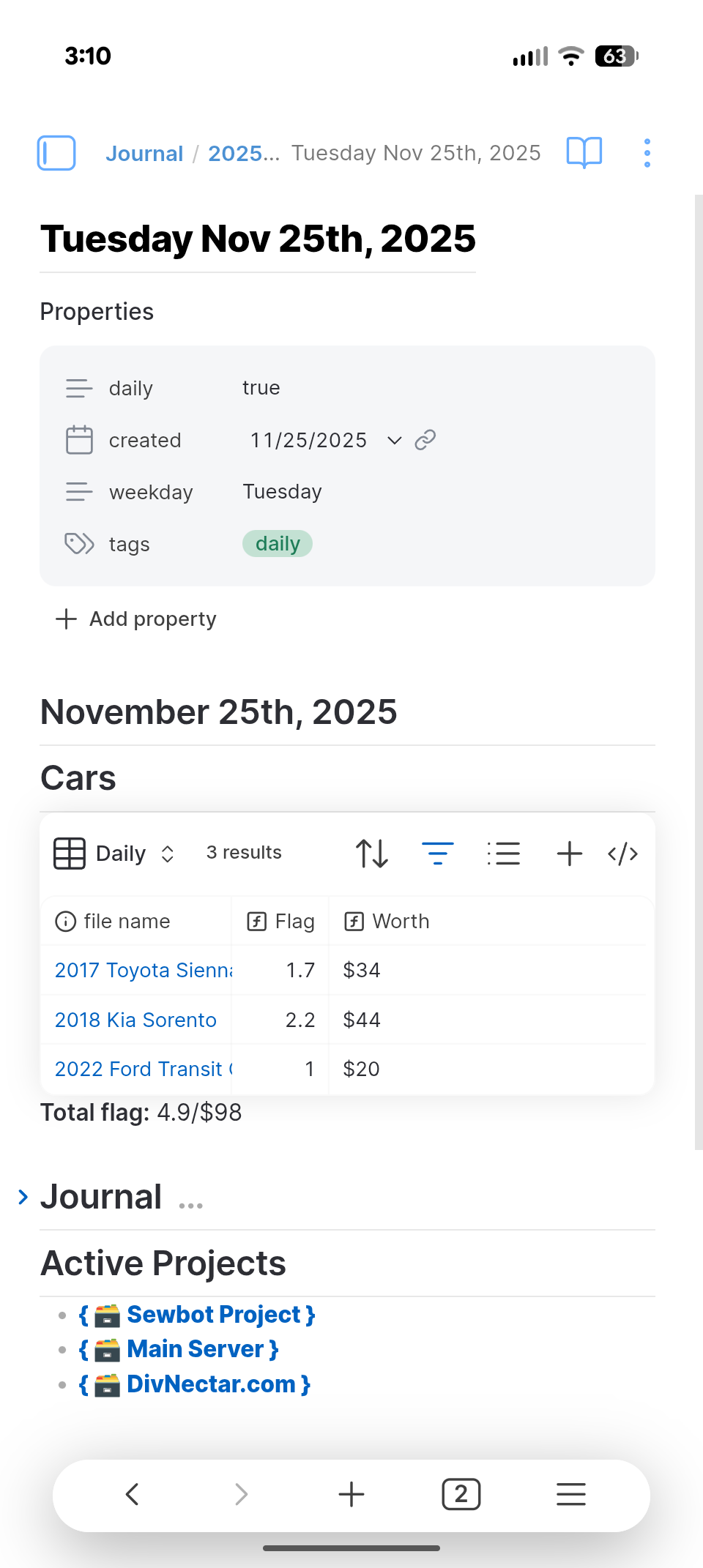
    I use Obsidian to keep track of my current and past projects, keep dev logs on projects, track my bills, track and organize my tasks, as a calendar, a journal, and so much more that I can’t think of. It’s kind of just my go-to app for everything now. When starting obsidian up I have a homepage that I designed to show me relevant information for a given day:

    Screenshot_20251125-151026.png

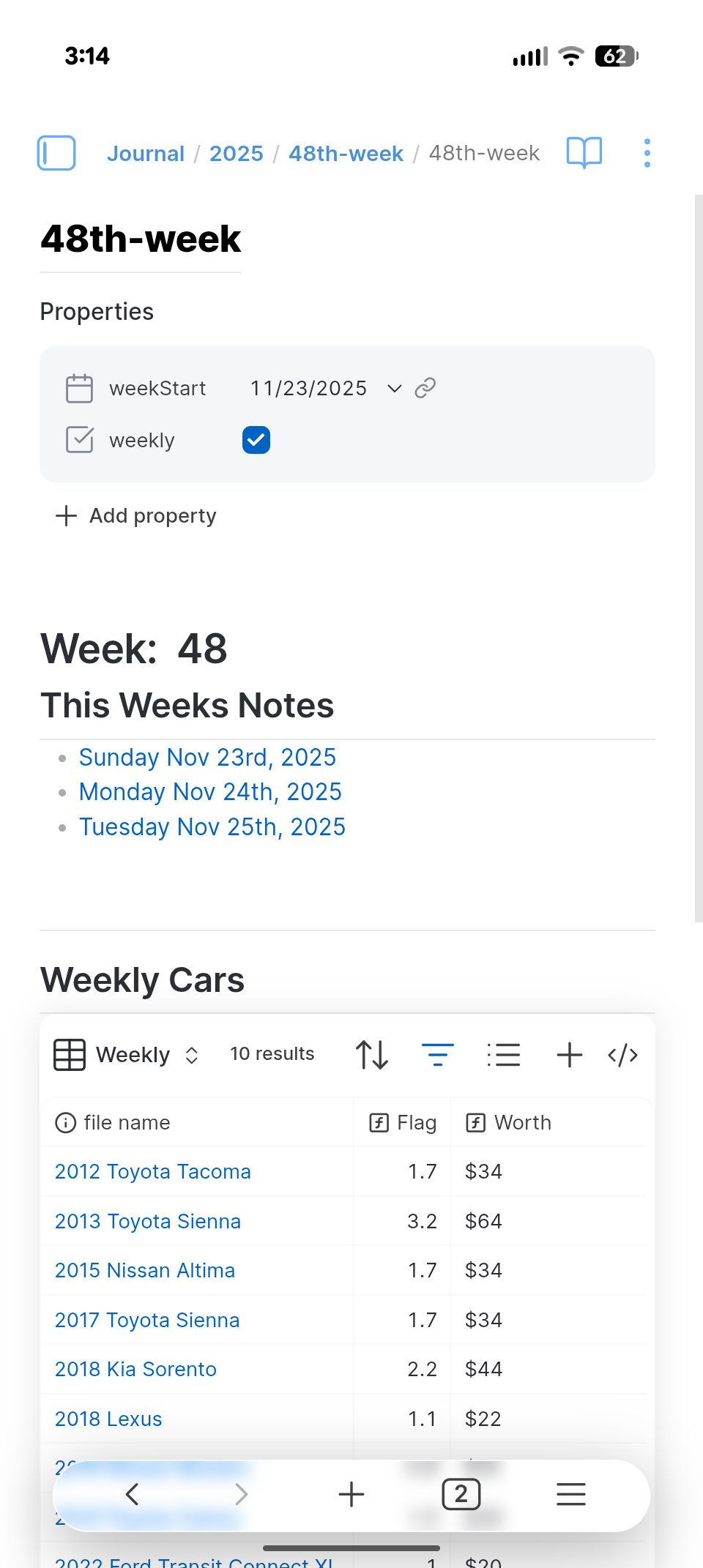
    This "homepage" is responsible for tracking my work orders at work (that’s a whole different write up lmao) as well as keeping track of any projects I’m currently working on. The projects at the bottom are actually links that when tapped/clicked will take you to the relevant note and tasks for that particular project. You’ll notice at the top of the note is a card for properties. These can be thought of as note "data" while the text in the note is just the "content". The notes data/properties can be used to make queries in obsidian based on what properties a note does/doesn’t have or even it’s particular values at any given time. Take a look at my weekly note file:

    Screenshot_20251125-151443.png
    So where you see this week’s notes is actually a query for other notes that were created during the same week. Each of my daily notes for that week returns true for my query to show me a list of all daily notes for each week. This is the true power of Obsidian – not only can you just dump your brain into it, but with a little forethought you can also organize your brain with it. It truly is a second brain when used correctly. Similarly to the "weeks notes" query, the "Weekly Cars" section queries for all work order notes I’ve made in a week, which are denoted by the "flag" property on the notes which is a number for how much that work order was worth. Using that property and some math I can aggregate everything I’ve worked on in a week and see what my paycheck will be (before taxes ofc).